long-awaited leaked.
IDA Pro 6.1 + HexRays 1.5 leaked: http://t.co/EXqytpT (sendspace.com).
Epic story: http://t.co/n7awBas (rus)
Read more...
Wednesday, July 13, 2011

Thursday, June 2, 2011
Unpacked bootmgr x86 part
Unpacked bootmgr
First 5 sections is correct. Other segments are wrong. But anymore IDA can associate it with pdb.
This version is check Win 7 Sp0. You also can find free version or asking me.
Also there are small differences after ms-advisory-2506014-x64.
Read more...
First 5 sections is correct. Other segments are wrong. But anymore IDA can associate it with pdb.
This version is check Win 7 Sp0. You also can find free version or asking me.
Also there are small differences after ms-advisory-2506014-x64.
Tuesday, April 12, 2011
IDAPython and CTF Task
Few month ago I read post “IDA + Python = Love” in “Hacker” journal and been a pist off, because it is translate from HexBlog
Every CTF quals we have interesting reverse task with Brute Force. Let's get reverse 100 from RuCTF quals 2009.
It was pretty simple binary with checking string function.

First of all start debugger and open python command line.
In console menu you can see results:
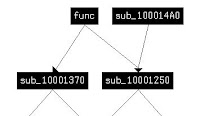
Another Example, It's necessary to call some function with different parameters. Look at reverse 200 in RuCTF quals 2009. We have a hex string 0408151623426C12 and dll. Find a upper function in Graph mode.

If you have a Hex-Rays(or IDA 5.5) you can decompile it and get a function prototype. Here is it
Like in last example
Result: 69da2403d2416d3c8042625839d400
Since I starting interesting boot code in Windows, I use bochs for any researches. Support of bochs in IDA start from 5.4 version. IDA 5.5 can works only with bochs 2.3.7, because can't get register information from new versions. IDA 6.0 with IDA 5.5 plugins of bochs works fine with 2.4.5.
I didn't make this task in CTF time, but I have a one interesting decision method. You can read detailed write up on Leet More blog.
First of all lets make bochsrc file for issue500.bin.
A already has one. This example works fine in 2.4 and 2.3. For you purpose only modify string as you need
Next step is starting IDA with bochs. Unfortunately I don't have full IDA version upper then 5.5. And can't use Appcall. IDA 6.0 demo send me this screen.

So I will talk about IDA 5.5 in this section and if you have newer version PLEASE check Appcall for 16bit code. I hope it will works fine.

Starting IDA. Then i main menu choose Debugger->Run->Local Bochs Debugger.
In next window choose full path to *.bxrc file.
Next step is "Debug options->Set speciefic options"
 Set full path to bochsdbg.exe, and choose Disk image.
That's all preferences which we need. Start debugger and wait until IDA create db. Then bochs told you about bad disk geometry - push continue. And then you image will ask you a password. Look at the call stack and find "debug#" segment. Put bp after "int" and push enter.
Now you are in input pass function and lower a pass checker function. At the picture you can see this simple function, which called for each simbol. DX started from 0 and after all symbols must be 0x2002.
You can write algorithm on python or C, but it cool - use debugger for brute.
 Please check it in newer version of IDA and give me know.
Really crazy task with brute. I will show you script for my first idea about this task. Shortly we have a binary, which want 10 symbols string which satisfy claims of sub_40181A(brute_f). This function check input string with table started from 0x403182. Indexing in dict and so on makes me crazy so I make a script which reverse function execution. It means that we get a last value - 0xD4, find it in dictionary, calculate offset and search it again.
I get a string like h2 h2h2 h2. reverse it to 2h 2h2h 2h and put in program input - get a 50%.
Then if you want to check possible variants you need a construction like this. (val_4d = 0x40317E)
Thank you for attention. Have a nice CTFs with IDApython.
Read more...
Appcall is a mechanism used to call functions inside the debugged program from the debugger or your script as if it were a built-in function.So you don't need a ctypes for simple operations.
Today I will show how you can use this technics in different CTF tasks with IDA 6.0 demo.
RuCTF2009 Quals Reverse 100
Every CTF quals we have interesting reverse task with Brute Force. Let's get reverse 100 from RuCTF quals 2009.
It was pretty simple binary with checking string function.
- Initialize Appcall object - find a function by name and confront prototype.
- Find String pointer with IDC LocByName function and patch them by PutDataList.
- Initialize permutation object and start the script.
import string
from idautils import PutDataList
from idc import LocByName
from itertools import product
brute = Appcall.proto("brute_f", "int __cdecl brute_f();")
def patchString( val ):
PutDataList( LocByName('string'), map( lambda(i):ord(i), val))
for i in xrange(3):
for str in product( string.letters + string.digits, repeat=i):
patchString(str)
if brute() == 1:
print ''.join(str)
from idautils import PutDataList
from idc import LocByName
from itertools import product
brute = Appcall.proto("brute_f", "int __cdecl brute_f();")
def patchString( val ):
PutDataList( LocByName('string'), map( lambda(i):ord(i), val))
for i in xrange(3):
for str in product( string.letters + string.digits, repeat=i):
patchString(str)
if brute() == 1:
print ''.join(str)
In console menu you can see results:
aF nh oY p4 rV sg D5 FW Gf HH Iy Tv UG Zi 18 2k 3Z
RuCTF2009 Quals Reverse 200
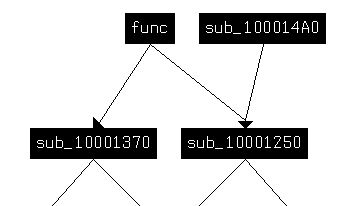
Another Example, It's necessary to call some function with different parameters. Look at reverse 200 in RuCTF quals 2009. We have a hex string 0408151623426C12 and dll. Find a upper function in Graph mode.
If you have a Hex-Rays(or IDA 5.5) you can decompile it and get a function prototype. Here is it
int __fastcall func(char *, char *, char *);Presence of calling convention is obligatory.
Like in last example
- initializing Appcall object
- creating input and output buffers.
- calling function
test = Appcall.proto("func", " int __fastcall func(char *, char *, char *);")
bufin = Appcall.buffer( "\x04\x08\x15\x16\x23\x42\x6C\x12")
buffout1 = Appcall.buffer ( "\x00" * 15 )
buffout2 = Appcall.buffer ( "\x00" * 15 )
test( bufin, buffout1, buffout2 )
print buffout1.value.encode('hex')
bufin = Appcall.buffer( "\x04\x08\x15\x16\x23\x42\x6C\x12")
buffout1 = Appcall.buffer ( "\x00" * 15 )
buffout2 = Appcall.buffer ( "\x00" * 15 )
test( bufin, buffout1, buffout2 )
print buffout1.value.encode('hex')
Result: 69da2403d2416d3c8042625839d400
Codegate 2011 Quals Issue 500
Since I starting interesting boot code in Windows, I use bochs for any researches. Support of bochs in IDA start from 5.4 version. IDA 5.5 can works only with bochs 2.3.7, because can't get register information from new versions. IDA 6.0 with IDA 5.5 plugins of bochs works fine with 2.4.5.
I didn't make this task in CTF time, but I have a one interesting decision method. You can read detailed write up on Leet More blog.
First of all lets make bochsrc file for issue500.bin.
A already has one. This example works fine in 2.4 and 2.3. For you purpose only modify string as you need
ata0-master: type=disk, mode=flat, translation=auto, path="$CODEGATE\iss500\issue500.bin", cylinders=6500, heads=255, spt=63, biosdetect=auto, model="test"
Next step is starting IDA with bochs. Unfortunately I don't have full IDA version upper then 5.5. And can't use Appcall. IDA 6.0 demo send me this screen.

So I will talk about IDA 5.5 in this section and if you have newer version PLEASE check Appcall for 16bit code. I hope it will works fine.

Starting IDA. Then i main menu choose Debugger->Run->Local Bochs Debugger.
In next window choose full path to *.bxrc file.
Next step is "Debug options->Set speciefic options"

That's all preferences which we need. Start debugger and wait until IDA create db. Then bochs told you about bad disk geometry - push continue. And then you image will ask you a password. Look at the call stack and find "debug#" segment. Put bp after "int" and push enter.
Now you are in input pass function and lower a pass checker function. At the picture you can see this simple function, which called for each simbol. DX started from 0 and after all symbols must be 0x2002.
You can write algorithm on python or C, but it cool - use debugger for brute.
RuCTF 2011 Quals Reverse 300
Really crazy task with brute. I will show you script for my first idea about this task. Shortly we have a binary, which want 10 symbols string which satisfy claims of sub_40181A(brute_f). This function check input string with table started from 0x403182. Indexing in dict and so on makes me crazy so I make a script which reverse function execution. It means that we get a last value - 0xD4, find it in dictionary, calculate offset and search it again.
start = "D4"
outstr = ""
import string
strOld = "23456789TJQKAhscd "
start_offset = LocByName("dict")
for i in xrange(0xa):
offset = FindBinary( LocByName("dict"),SEARCH_DOWN, start) - start_offset
print "VA %x RVA %x" % (offset + start_offset, offset)
for i in xrange(0x13):
val = (offset - ( i >> 1 )) / ( 2 * 0x13 )
if (val * ( 0x13 * 2) + i * 2) == offset:
print hex(i) + " '" + strOld[i] + "' " + hex(ord(strOld[i])) + " --> " + hex( val )
start = "%x" % val
outstr += strOld[i]
break
print outstr
outstr = ""
import string
strOld = "23456789TJQKAhscd "
start_offset = LocByName("dict")
for i in xrange(0xa):
offset = FindBinary( LocByName("dict"),SEARCH_DOWN, start) - start_offset
print "VA %x RVA %x" % (offset + start_offset, offset)
for i in xrange(0x13):
val = (offset - ( i >> 1 )) / ( 2 * 0x13 )
if (val * ( 0x13 * 2) + i * 2) == offset:
print hex(i) + " '" + strOld[i] + "' " + hex(ord(strOld[i])) + " --> " + hex( val )
start = "%x" % val
outstr += strOld[i]
break
print outstr
I get a string like h2 h2h2 h2. reverse it to 2h 2h2h 2h and put in program input - get a 50%.
Then if you want to check possible variants you need a construction like this. (val_4d = 0x40317E)
brute = Appcall.proto("brute_f", "int __cdecl brute_f();")
PutDataList( LocByName('string'), b)
brute()
if (Dword(LocByName("val_4d"))) == 0xd4:
print "OK"
PutDataList( LocByName('string'), b)
brute()
if (Dword(LocByName("val_4d"))) == 0xd4:
print "OK"
Thank you for attention. Have a nice CTFs with IDApython.
Friday, March 18, 2011
RusCryptoCTF T4 Task
Lets show you decision of T4 RusCrypto task from Ufologists.
We were given an access to the box on which key container was running. It was uploaded not long ago by third party developer. Container search ended with BSOD with help of antirootkit and antiviruse. Analyze the dump and find the key in root of OS.
P.S.We know for sure that flag contains only latin symbols. download file
First of all unzip it.And get memory dump. Put it in to WinDbg.
Let's start
kd>!analise -v
WARNING: Stack unwind information not available. Following frames may be wrong.Something crazy and Unknown. Lets Google driver name klif.
989e9c58 8a267f44 badb0d00 00000000 00000801 nt!Kei386EoiHelper+0x291c
989e9ce4 81a2aa31 00000004 00000d54 00000000 klif+0xdf44
989e9d54 81a2b2ff 00000000 00000000 8d41f348 nt!IoSetIoCompletion+0x3bd
989e9d74 819f1a2d 8d41f348 00000000 00000001 nt!IoSetIoCompletion+0xc8b
989e9dc0 8184aa3e 905f5973 83d2e8a0 00000000 nt!RtlDestroyAtomTable+0x50f
00000000 00000000 00000000 00000000 00000000 nt!RtlSubAuthorityCountSid+0x3c4
It's Antivirus. Remember that Memdump was made with Antivirus and antirootkit.
Ok. Let's see all drivers in system.
kd> lm oft
(It's last drivers)
905de000 905e1d00 Dbgv \??\C:\Windows\system32\Drivers\Dbgv.sys Sat May 17 19:18:56 2008 (482EF760)One of them was developed in 2011.And one in 2010. All another drivers there are in Vista.
905e2000 905f0000 atapi32 \??\C:\Windows\System32\drivers\atapi32.sys Wed Mar 09 23:33:41 2011 (4D77E425)
905f0000 905f8700 Normandy \SystemRoot\System32\Drivers\Normandy.SYS Fri Apr 30 08:00:34 2010 (4BDA55E2)
93c10000 93e11000 win32k \SystemRoot\System32\win32k.sys Sat Jan 19 08:36:46 2008 (47918C6E)
93e20000 93e37000 dxg \SystemRoot\System32\drivers\dxg.sys Sat Jan 19 08:36:11 2008 (47918C4B)
93e50000 93e59000 TSDDD \SystemRoot\System32\TSDDD.dll Sat Jan 19 09:01:09 2008 (47919225)
93ea0000 93ec8a80 vmx_fb \SystemRoot\System32\vmx_fb.dll Fri Oct 03 22:41:58 2008 (48E66776)
Google Normandy.sys -> It's RkU. (antirootkit)
Let's analyze driver.
kd> !dh 905e2000
Debug Directories(1)Sure it's some task for RusCrypto.
Type Size Address Pointer
cv 70 acb8 98b8 Format: RSDS, guid, 1, d:\develop\my_project\ruscryptotask\driver\ruscrypto\objfre_win7_x86\i386\Ruscrypto.pdb
Get file from memory.
kd> .writemem d:\dumpnt.exe 0x905e2000 L?E000
OK. Add it to IDA. Base program on 905e2000.
Remember that driver unloads init section. So DriverEntry we can't find.
Find a peaces of code.

IDA colored code. Push 'P' to make function.
Let's analyze imported functions. IDA knows about .idata section. So all imported functions are red.

Imported function are
.idata:905E4000 extrn unk_905E4000 ; CODE XREF: sub_905E4422+712 pAnalyze all funcrions with Windbg.
.idata:905E4000 ; DATA XREF: sub_905E4422+712 r
.idata:905E4004 extrn unk_905E4004 ; CODE XREF: sub_905E4422+70B p
.idata:905E4004 ; DATA XREF: sub_905E4422+70B r
.idata:905E4008 extrn unk_905E4008 ; CODE XREF: sub_905E4422+6FC p
.idata:905E4008 ; DATA XREF: sub_905E4422+6FC r
.idata:905E400C extrn unk_905E400C ; CODE XREF: sub_905E4422+22 p
.idata:905E400C ; DATA XREF: sub_905E4422+22 r
.idata:905E4010
.idata:905E4014 extrn unk_905E4014 ; CODE XREF: .rdata:905E4BAA p
.idata:905E4014 ; DATA XREF: .rdata:905E4BAA r
.idata:905E4018 extrn unk_905E4018 ; DATA XREF: sub_905E4BB6 r
kd>u poi(905E4000) and rename in IDA.

Now Import looks like:

More comfortable. And. Driver allocates pool and didn't Free it.
Another interesting things is MmProtectMdlSystemAddress function.
NTSTATUS MmProtectMdlSystemAddress(
  __in  PMDLX MemoryDescriptorList,
  __in  ULONG NewProtect );
Driver make Mdl from memory [ebp-80h] + 0x236, then Protect in as EXECUTE. And Call it later.
Interesting pool. How we can find it. Lets see another function for memory.
PVOID ExAllocatePoolWithTag(
  __in  POOL_TYPE PoolType,
  __in  SIZE_T NumberOfBytes,
  __in  ULONG Tag
);
Now we sure, that driver allocate this pool and put pointer to [ebp-80h].
We need to find this pool in memory, but pointer was in stack and driver lose it...
System don't lose it and we can find pool by TAG.
Params of ExAllocatePoolWithTag is
PoolType [in]
Specifies the type of pool memory to allocate. For a description of the available pool memory types, see POOL_TYPE.
NumberOfBytes [in]
Specifies the number of bytes to allocate.
Tag [in]
Specifies the pool tag for the allocated memory. Specify the pool tag as a character literal of up to four characters delimited by single quotation marks (for example, 'Tag1'). The string is usually specified in reverse order (for example, '1gaT'). The ASCII value of each character in the tag must be between 0 and 127. Each allocation code path should use a unique pool tag to help debuggers and verifiers identify the code path.
Reverse string order. So 0x4D646Ch is 'Mdl', reverse it 'ldM'.Windbg again.
kd>!poolfind ldM
Nothing. Let's see all pools.
kd>!poolused
If you get error add c:\symserver;SRV*c:\symserver*http://msdl.microsoft.com/download/symbols to symbol path.
Sure ldM is exist.
ldM. 1 576 0 0 UNKNOWN pooltag ' ldM', please update pooltag.txtSize 576 is 240 in hex. We allocate 0x238. 8 bytes it's header.
Another way to get pool is kd>!poolfind 0x004D646C
Again fail. Lets
kd>!poolfind 0x004D646C 0
8d4a9a60 size: 240 previous size: 30 (Allocated) ldM.
Ok. We find a pool. Dump it.
kd> .writemem d:\dumpnt2.exe 0x8d4a9a60 L?240
First 8 bytes is header. All another is code. Put it in IDA.

Inline Function without any import and with some data on stack. Execute it with IDA and Bochs.

Here is answer.
P.S. Encryption in binary was DES. Encryptoin in pool was xtea.
Monday, February 21, 2011
Saving db in IDA demo 6
As you know new free version of IDA can't save databases. For some purposes this version is enough, but some times we need to save info. So I will show how you can save IDA db to sqlite.


Read more...
- Download and install IDA demo 6.
- Get a IDApython with IDA 6 support.
- MyNav.
After installing all stuff and starting IDA you will see this window.

IDA demo doesn't export PLUGIN_ENTRY. idaapi.add_menu_item("Edit/Plugins/" ... doesn't work.
Before starting mynav.py script it's necessary to replace strings in registerMenus function from "Edit/Plugins/" to "Edit/Other/". So all MyNav stuff will be able in Other directory.
Rigth now all you need it's choosing "Edit/Other/MyNav: Advanced utilities"

And save current session to DB. Example of saving database available on joxeankoret web site.
Subscribe to:
Posts (Atom)